The door says "LOCKED OUT" / Tailwind doesn't open or close the door. How do I fix it?
After 2 failed attempts the Tailwind iQ3 controller goes into a “locked out” state as required by law referencing the UL 325 safety standard. Once locked out it will no longer respond to door commands. This lockout state can easily be cleared by following any of the 3 methods below:
1) Cycle the door (open / close) using any other method such as the wall control, a remote, etc.
Please note: If the door sensor is the problem causing the lockout, cycling the door will probably not clear the lockout and you'll need to follow method 2 or 3 below to clear it.
2) Send a restart command by tapping the gear icon to the right of your device on the "My Devices" screen in the app - then tap "Restart".
3) Unplug the Tailwind controller, wait at least 5 seconds, and plug it back in.
You might need to go to a different screen in the app such as "My Devices" and then return to the door control screen. The lockout should be cleared. It may not clear immediately if you stay on the door control screen in the app while you clear the lockout in your device.
Once you have cleared the lockout, you can start the troubleshooting process below to determine the cause and fix it.
So why are you getting a lockout? Tailwind tries to open or close your door 2 times (it automatically tries a second time if the first attempt fails). There are generally 2 categories of failure.
1) The door operates but does something unexpected like stops part way or operates a second time. If this is happening to you, jump to CASE 1 below.
2) The door does nothing at all. If this is happening to you, jump to CASE 2 below.
CASE 1
The door is moving but does something unexpected like stops part way or operates a second time.
Please cycle the door up / down using your wall control or remote control while keeping the Tailwind app open on the door control screen.
OPENING PROBLEM:
If the door icon in the app DOES NOT show the door open within 2 seconds of the door STARTING to open there is most likely a problem with the door sensor. Jump to (A) below. If the door icon DOES show the door open within 2 seconds but the door still opens only part way using the Tailwind app, jump to "DOOR PULSE SETTINGS" below.
A) If you have a door sensor that mounts above the door, the problem is the sensor thinks the magnet is still nearby even when the door is open. The magnet used in the "above door" sensor system is very strong and can temporarily "magnetize" metal objects near the sensor. This can be something as simple as a drywall screw in the wall near the sensor. The solution is to remove the magnet from the bracket, flip it upside down and hold it near the sensor for about 3 seconds. This will neutralize any temporary residual magnetism in any nearby metal objects because the magnet is now facing the opposite direction. If necessary, move the sensor away from any metal objects by at least 2 inches. If you remove the sensor from the wall and suddenly the Tailwind app shows the door is open, there is a strong possibility something metal near the sensor became magnetized. Simply mount the sensor in another location - even just a couple inches away from the original location. Then re-install the magnet on the door, but increase the gap to about 1 inch (25mm) between the sensor and the magnet. The magnet bracket can be bent to provide additional adjustment of the gap if needed.
B) If you have a door sensor that mounts to the J-track on the side of the door, please contact support@gotailwind.com
CLOSING PROBLEM:
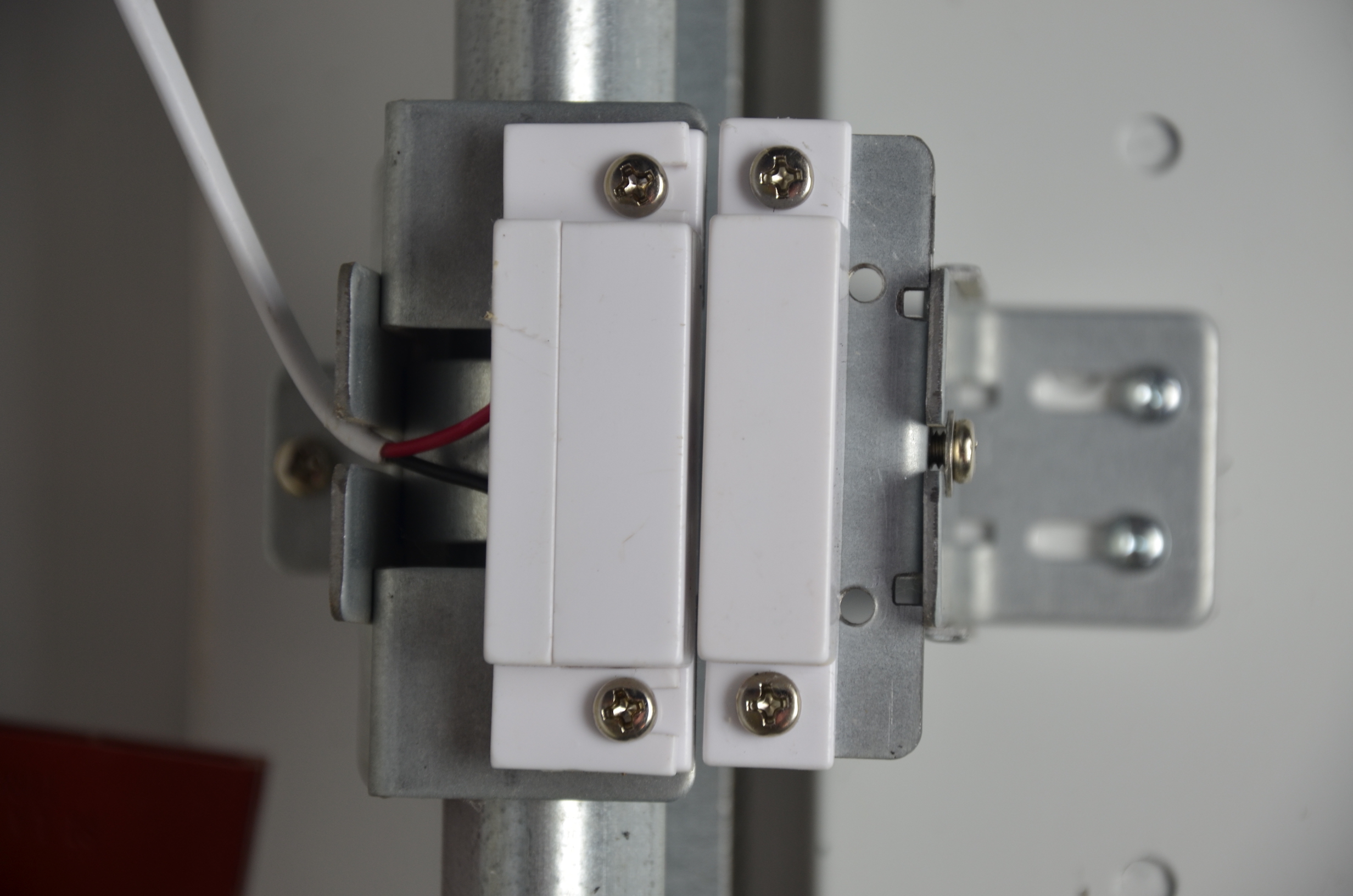
If the door icon in the app DOES NOT show the door closed within 2 seconds of the door FINISHING to close, there is most likely a problem with the door sensor. The problem is the sensor does not realize the magnet has come near the sensor. The solution is to align the magnet so it comes closer to the sensor when the door is in the closed position. This is most common with our older "legacy" door sensors (shown below) as they need to be much more closely aligned than the newer style that mounts above the door, which can easily work at gaps of 1 inch.
The bottom line is this: The magnet is probably not coming close enough to the sensor, or is not aligned properly. See the picture below for proper installation of the track mount sensor.
https://gotailwind.zendesk.com/